


Forum, a Facebook app
4.5257.00 Reviews
App Specs
- Version
- 22.0.0.2.108
- Updated On
- License
- Free
- Downloads
- 100,000+
- Developer
- Meta Platforms, Inc.
- Categories
- Social
- Platform
- Android
Screenshots
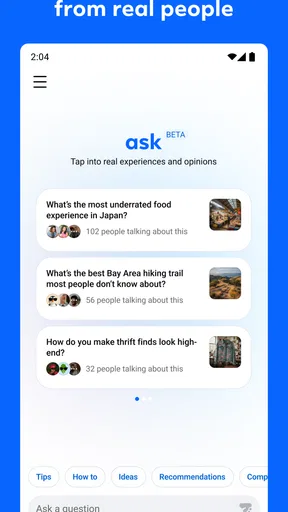

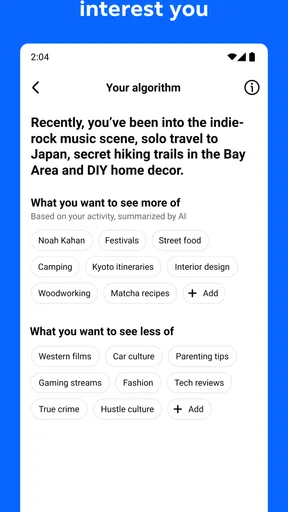
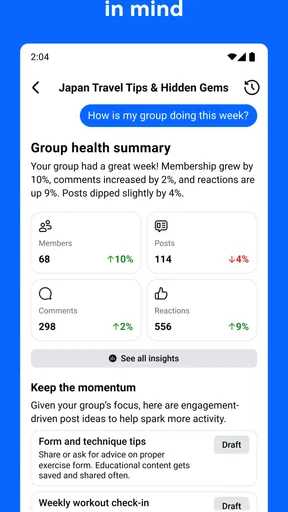
 Analysis by AppCompare
I approached Forum as a focused social app rather than another general-purpose feed. Its purpose is simple: give groups a dedicated place to talk, organize discussions, and keep shared conversations from getting lost among unrelated posts. That narrow focus is also its main appeal. If you already participate in a Facebook group and want a cleaner space for that community, the idea makes sense. If you are looking for a broad social network with endless discovery, entertainment, and personal updates, it may feel too limited.
The app comes from Meta Platforms, Inc., and it is free to use. It is listed for Teen users and belongs to the social category. The store summary describes it as a dedicated space for groups, while the short description reduces the idea to “Forum.” I found that the most useful way to judge it is not by how much it offers, but by whether it removes a specific problem: finding and following group conversations without the distractions of a larger social environment.
Getting past the first points of friction
The first difficulty is understanding exactly what role this app is meant to play. It is easy to expect a complete replacement for every Facebook interaction, then wonder why the experience feels narrower. I would treat it as a group-centered companion: a place where the value depends heavily on whether the communities you care about are available and active there.
That distinction matters during setup. Before spending time adjusting your habits, check that you are using the intended account and that the groups you expect to see are connected to that account. A surprising amount of apparent app trouble is really an account mismatch. If a familiar group seems absent, I would first verify the sign-in details and the exact group identity instead of assuming the application has lost the community.
It is also worth checking the basic device requirements before troubleshooting deeper. Forum requires at least Android 10 or an equivalent supported mobile environment. On an older phone, installation problems, crashes, or unusual behavior may be caused by the operating system rather than the group service itself. Updating the operating system, when the device supports it, is a sensible first step.
The current version is 22.0.0.2.108, so I would make sure the installed build is current before judging reliability. An outdated build can create confusing behavior after a service-side change. I would also restart the phone after updating, particularly if the app was installed while other applications were running or storage was nearly full.
Another practical check is the network connection. Group content can appear incomplete when a connection is unstable, especially if the app loads some parts of a discussion but not others. Switching between a reliable Wi-Fi connection and mobile data can help identify whether the issue follows the app or the network. I would avoid repeatedly tapping refresh while a weak connection is struggling, because that can make it harder to tell whether anything actually changed.
Worth Reading Before You Choose

EA SPORTS FC Mobile 26 Is a Bigger Football Game, but It Takes Time

Flipboard Shows What News Apps Must Do Beyond the Feed

Switching to Android Auto Means Rethinking Your Driving Routine

Google Calendar Makes a Crowded Week Easier to Manage

Ludo King Makes the Most of the Minutes Between Plans

Baby Panda World Brings Quick Play to Modern Phones, but Its Game Library Feels Busy
Notifications deserve a deliberate setup rather than an automatic acceptance. A group-focused app can become noisy if every conversation produces an alert, but it can also become useless if all notifications are blocked. I prefer enabling alerts only for the communities where timely replies matter, then checking the phone’s notification settings if alerts stop appearing. The app may be working normally while the operating system quietly suppresses its notifications.
What to check before blaming the app
When a group is missing, I would compare several details: the account currently in use, the spelling or identity of the group, the network connection, and whether the group itself is active and accessible through the usual Facebook experience. This simple comparison is more useful than immediately reinstalling. Reinstallation can clear local problems, but it cannot restore a group that is unavailable through the account or service.
Login confusion is another common source of wasted time. If you use more than one Meta account, signing out and back in with the correct one may be enough. I would record which account is active before making changes, because repeatedly switching accounts can create a new layer of uncertainty about what content should be visible.
Storage and background restrictions can also affect the experience. A phone with very little free space may struggle with updates or temporary app data. Likewise, aggressive battery-saving settings can delay notifications and background refresh. These are general device checks, but they are particularly relevant here because a group app is judged by timely access to conversations, not just by whether its main screen opens.
If the app opens but a discussion does not update, I would first close and reopen it, then test another group or conversation. This comparison is useful: if all groups behave the same way, the issue may be account, network, or service related; if only one discussion is affected, the problem may be limited to that content or community. I would not assume that every missing post indicates a broken installation.
Recovering a group workflow without losing context
The best way to use Forum is to give each group a clear purpose. For example, I might use one community for local recommendations, another for a hobby, and another for a recurring activity. Before posting, I would read the recent conversation and decide whether my question belongs in an existing thread or deserves a new one. This small habit reduces duplicate discussions and makes later answers easier to find.
For a realistic everyday scenario, imagine a neighborhood group coordinating a weekend cleanup. I would check the group before leaving home, look for the latest confirmed details, and post one concise question if something remains unclear. Rather than opening several similar conversations, I would return to the original discussion and follow replies there. The dedicated group setting is most helpful when members treat it as a shared noticeboard and conversation space instead of a stream of disconnected announcements.
When a conversation appears to have disappeared, I would retrace the action that led to the problem. Did I switch accounts? Did I leave the group? Did I open a different community with a similar name? Did the network fail while the screen was loading? Checking the group from another reliable access point can help separate a local display issue from a change affecting the community itself.
If the app becomes unresponsive, my recovery order would be conservative: close it, reopen it, test the connection, restart the device, and check for an available update. Only after those steps would I consider clearing temporary app data or reinstalling. Before doing anything that could remove local state, I would make sure I know the account credentials and can access the same groups elsewhere. That is a much safer workflow than uninstalling first and discovering later that the problem was account-related.
It is also important to distinguish a delayed notification from a missing conversation. I would open the group directly instead of relying only on an alert. If the new content is visible there, the issue is probably notification delivery rather than group access. This distinction saves time and prevents unnecessary account changes.
For active groups, I recommend a lightweight personal routine: check important discussions at a predictable time, keep questions specific, and return to the same thread for updates. Forum works better when it supports a habit. It is less effective when users expect every group message to interrupt them immediately or when they use separate posts for every small follow-up.
When the problem is outside Forum
Some frustrations cannot be fixed inside the app. If a group administrator changes the community’s availability, if membership changes, or if content is no longer visible to your account, reinstalling Forum will not solve the underlying situation. The useful test is whether the same group and conversation can be reached through another normal Facebook access point. If it cannot, the issue is unlikely to be a local app failure.
Service interruptions are another possibility. When several groups fail at once, messages do not load, and other account functions also behave strangely, I would wait briefly and test again rather than repeatedly changing settings. A local reset is helpful for a damaged installation, but it cannot repair a wider platform problem.
Privacy expectations should be realistic too. Forum is a social app built around group participation, not a private notebook. I would avoid posting sensitive personal information simply because a conversation feels small or familiar. Before joining a discussion, consider who can access that group and whether the subject belongs in a community forum at all. For confidential matters, a private communication method is usually more appropriate.
The Teen content rating is a useful reminder that the app is intended for a broad social audience, but it does not remove the need for judgment. Group quality depends on the communities you join and the way members behave. A well-moderated group can be genuinely useful; a poorly managed one can produce clutter, arguments, or repetitive posts regardless of how clean the app itself feels.
This is also where the comparison with ordinary social-network alternatives becomes important. A general Facebook experience is better if you want personal updates, pages, marketplace activity, entertainment, and a wider range of interactions in one place. A messaging app is better for a small private conversation that needs quick replies. A dedicated forum service may be better for long-term searchable discussions, structured categories, or communities that do not depend on Facebook accounts. Forum makes the most sense when your priority is group-based social discussion within the Meta ecosystem.
I would skip it if you rarely participate in groups, dislike account-based social platforms, or need advanced organization for technical projects. The dedicated focus is not a substitute for project management, formal support software, or a private team workspace. It is also not ideal for someone who wants a completely independent community identity outside Meta’s services.
What the usage numbers suggest, and what they do not
Forum has an average rating of 4.7 from around 1.1 thousand ratings, with more than two hundred written reviews and over one hundred thousand installs. Those figures indicate that the app has attracted a meaningful early audience and that many users respond positively to its group-focused purpose. I would still read the written feedback with context, because a high average can reflect a strong match for a specific audience rather than universal usefulness.
The number that matters most for an individual user is whether the relevant groups are active. An app can be well received overall and still be disappointing if your community does not use it regularly. Before committing to it as your main group tool, I would test the communities that actually matter to you: look for recent activity, see whether replies arrive, and check whether the people you need are present.
Because it is free, the cost barrier is low, which makes that trial practical. The real investment is attention. If Forum simplifies the way you follow a few important groups, it can earn a place on your phone. If it merely duplicates conversations you already manage comfortably elsewhere, adding another app may create more friction than value.
My practical verdict after using it as a group tool
I see Forum as a focused option for people whose social life already revolves around Facebook groups. Its strength is its narrow purpose: group conversations can feel easier to approach when they are not buried inside every other kind of social activity. That focus also explains its limits. It cannot compensate for inactive communities, account confusion, weak connectivity, or expectations that belong to a full social network or a private messenger.
My advice is to start with one genuinely useful group rather than trying to move every conversation at once. Confirm the correct account, update the app, test notifications, and use an existing discussion before opening a new one. If content fails to appear, compare another group and another connection before reinstalling. Those checks address the most likely friction without risking unnecessary disruption.
The app is currently free, supports devices running Android 10 or newer, and carries a Teen age rating. Meta Platforms, Inc. has positioned it for a specific social habit rather than for every kind of online communication. I would recommend it to group members who want a dedicated place to keep community discussions visible, especially when the usual all-in-one feed feels distracting.
I would recommend a different option for private chats, formal collaboration, deeply structured forums, or social discovery beyond groups. For everyone else, Forum is worth trying when the community comes first. Its success depends less on flashy extras than on a simple question: do the groups you care about actually make better use of a dedicated space? If the answer is yes, this app can make everyday participation more manageable; if the answer is no, its focused design will feel more like a limitation than an advantage.
Pros
- Easy access to Facebook groups
- discussions
- and community updates in one place.
- Useful for discovering niche communities based on hobbies
- interests
- or local topics.
- Commenting and reactions make it simple to join ongoing conversations.
- Group notifications help users keep up with important posts and replies.
- Familiar Facebook design makes navigation comfortable for existing users.
Cons
- Requires a Facebook account
- which may discourage privacy-conscious users.
- Busy groups can produce too many notifications and repetitive posts.
- Content quality varies widely between communities and moderators.
- Personalized feeds may prioritize engagement over the most useful discussions.
- Some groups contain spam
- promotions
- or misleading information.
FAQs for Forum, a Facebook app
What is Forum, the Facebook app, and what can I do with it?
Forum is a Facebook-connected social discussion app designed to help people discover conversations, share opinions, and interact around different topics. After signing in, users can browse available discussions, publish posts or questions, comment on other members’ contributions, and react to content. Its usefulness depends on the communities and topics available, so the experience may vary according to your interests and activity level.
Do I need a Facebook account to use Forum?
Yes, Forum is designed to work with Facebook, so a Facebook account is generally required for registration or login. The app may request permission to access basic account information, such as your name, profile image, or email address, depending on its current setup. Before continuing, review the permissions and privacy details shown during sign-in, especially if you prefer to limit third-party access.
Is Forum free to download and use?
Forum can generally be downloaded without an upfront purchase, although availability and pricing may depend on whether you are using Android or iOS. Some features may be free, while optional services, premium functions, advertisements, or Facebook-related limitations could affect the experience. Check the official store listing before downloading to confirm current costs, supported devices, and any in-app purchase information.
Is Forum safe for sharing personal opinions and information?
Forum should be used with the same caution as any social platform connected to Facebook. Avoid publishing sensitive details such as your address, phone number, financial information, passwords, or private documents. Review the app’s privacy policy and Facebook permissions, use strong account security, and remember that posts or comments may be visible to other users depending on the community and privacy settings.
What should I do if Forum does not work or I cannot log in?
If Forum fails to open, crashes, or rejects your login, first check your internet connection and make sure the app and Facebook are updated. Closing and reopening both applications, restarting your device, or reinstalling Forum may resolve temporary problems. Also verify that your Facebook account is active and that required permissions are enabled. If the issue continues, contact the developer through the official app-store support page.


